5.2 Create Object
Object is created by the following syntax.
ObjectType [: ValueType ] ObjectName ;                                 … [1]
ObjectType [: ValueType ] ObjectName [n];                             … [2]

var  variable name = new ObjectType [: ValueType ];                           … [3]
var  variable name = new ObjectType [: ValueType ] ();                        … [4]
var  variable name = new ObjectType [: ValueType ] ( constructor argument );    … [5]
From Ver.5.0.3, it is possible to specify ValueType by creating an object with new.
For formats of [1] and [2], the object that executed this program is connected to the hierarchical structure that becomes the parent object, and the object with the name specified by ObjectName is generated.
[: ValueType] is an optional option that specifies the data attributes of the object.
Example
TextBox: Number b;
In the above example, a text input field is generated as numeric type data. Some ValueTypes are fixed depending on the type of class. For example , the DateEdit class object is always a Date type object, so you cannot specify ValueType . If you do not specify a ValueType in the creation of an object that can specify a ValueType like a TextBox , it will be executed as a String type.
[N] of format [2] specifies arraying. When [] is added, the object is created as an array, and n specifies the number of elements at the time of creation.
In the case of the format of [3] [4] [5], the reference of the generated object is stored in the var variable. In this case, the object will not have a unique name and will be accessed by variable name. Variables are not objects, so their names may change depending on the situation.
Example
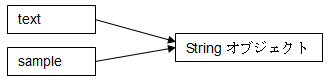
var text = new String ("sample1");
var sample = text;
In this example, the String object can be referenced by the name of text or sample . Both point to the same instance in the String object reference. therefore,
text.value = "sample2";
print (sample);
Then , what is displayed in the debugger by the print function is “sample2” .
In the case of format [4], the constructor of the class is called and the default initialization is performed. In the case of format [5], the initialization of the object can be instructed by the constructor argument. The content to be initialized, the content to be specified, the meaning, and the number of parameters of the constructor vary depending on the type of object.
Example Constructor for Array class
var a = new Array (" aaa ", " bbb ", " ccc ");
” aaa “ , “ bbb “ , “ ccc “ are generated as Array elements.
Example String class constructor
var s = new String ("sample");
The content will be the character string of sample .
Object initialization
Properties can be set and initialized at the same time as Object is created.
DisplayType ObjectName {
    X = 10;
    Y = 10;
    Width = 20;
    Height = 20;
    :
}
DataType ObjectName = 10;
Some class properties cannot be changed after initialization. Such properties must always be set at initialization.
Hierarchical structure of objects
Most objects belong to a hierarchical structure that is based on “//” ( Root object). To add a new object to the hierarchical structure, write as follows.
DataType Object1 {
    DataType Object2 {
        DataType Object3 {
            ::
        }
    }
}

Some objects have constraints on the hierarchical structure. For example, in the case of a Spread object that displays in tabular form, the Display object that can be created as a child is limited to SpreadRow , and the Display object that can be created as a child of SpreadRow is limited to SpreadColumn .
This constraint is that the Spread object is not a table by itself, but a complex of Spread objects that arbitrate the frame and the whole of the table, SpreadRow objects that represent the rows of the table, and SpreadColumn objects that represent the columns of the table. This is because it expresses.
The name of the object
Objects in the object tree that originate from “//” ( Root object) can be named. Object names have the following restrictions:
1. Start with alphabetic or double-byte characters
2. The second and subsequent characters must be alphanumerical, underscore (_) or double-byte characters.
Correct example
ABC
Japanese object name
txt customer code
txt_custcode
Incorrect example
12_code            ← Starts with a number
txt custcode      ← including white space
txt- custcode      ← including symbol
txt Customer address (from prefecture to city) ← Too long
You can use double-byte spaces and symbols, but please avoid using them as much as possible because it is easy to make a mistake.
Variable names in double-byte characters may be garbled and difficult to handle depending on the environment (such as when managing CRS sources on a UNIX -based OS ). Please be careful.
Object name collision
Collisions between objects
If an object with the same name already exists in the same hierarchy that created the new object, the existing object will be automatically deleted.
Collision with property
If you create a child object with the same name as the property name, the object search takes precedence. Properties are hidden behind objects and cannot be used.
Collision with method
If you create a child object with the same name as the method name, the object search takes precedence. The method is hidden behind the object and cannot be used.
Collision with class name
If you create an object with the same name as the class name, you will not be able to access the static methods and properties of the conflicting class within the scope of that object.