FlexIndentLabel Class
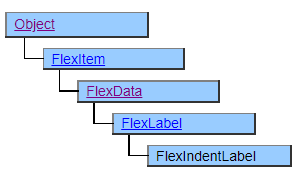
The FlexIndentLabel class is a class that defines how FlexView cells are displayed.
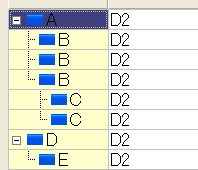
FlexIndentLabel is a class derived from FlexLabel and can display strings and icons in the same way as FlexLabel. In addition, indented display can be performed by specifying the Key property and ParentKey property. This display is similar to FlexTreeHeader, but FlexIndentLabel is a hierarchical display in one column, and the depth of the hierarchy changes dynamically depending on the data set in the Key and ParentKey properties. Also, the part that can be collapsed is only the beginning of the indent, but the contents of the following columns are also displayed in the collapsed row.
Place the FlexIndentLabel object below the FlexRecord object.
Screen Display Example
Layout Constraint
FlexIndentLabel objects cannot be placed to the left (previous in definition order) of objects in FlexHeader and its derived classes.
FlexIndentLabel cannot be used in more than one column.
It can be placed as a child of FlexColumnSet, but the indented connecting lines are not connected.
Default properties and ValueType
The default property is Value. ValueType can be String Number, Fixed, Date and UString.
UString have been added since Ver.4.2.0