STreeItem Class
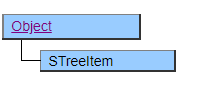
An accessor class for manipulating each item in the STree class. Be sure to get it from the STree class and use it.
Default properties and ValueType
The default property is Value. The value type specification is invalid.
Format for adding items by passing an XML Document
There are the following rules in XML when adding an item using an XMLDocument object with the Append and Insert methods.
- The root node is skipped.
- The tag name will be skipped, so set any value.
- The corresponding properties can be set by setting values in the title, openicon, closeicon, and value attributes of the tag.
- When only one of the openicon and closeicon attributes is set, both openicon and closeicon have the same value.
- If a value is described in the value attribute, it will be set as a string type.
An example of XML description is shown below.
<xml><!-- 本タグは読み飛ばされる -->
  <item1 title="abc">
    <item11 title="def" openicon="1"/> <!-- openicon=closeicon=1; -->
    <item12 title="ghi" value="111"/>
    <item13 title="jkl" value="222>
      <item131 title="aaa"/>
        <item132 title="bbb"/>
      </item13>
    </item1>
    <item2 title="mno"/>
</xml>
When the above XML is specified in the Append method, the tree with the following structure is added as its own child, and the accessor of the object whose title is “abc” is the return value.
┌abc┬def
│  ├ghi
│  └jkl┬aaa
│    └bbb
└mno
Invalid Accessor
If the item pointed to by the STreeItem object is deleted or the STree object to which the item belongs is deleted, the accessor becomes invalid and no further operations are accepted.
It can be determined if it is not an invalid accessor by checking if the Id property is non-zero.
Relationship of Next Visible and Next, Prev Visible and Prev
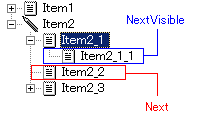
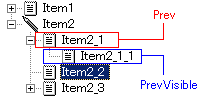
The Next and Prev properties refer to the previous and next items on their own hierarchy, while the NextVisible and PrevVisible properties refer to the previous and next items based on the display order of the screen.
The relationship between the Next property and the NextVisible property based on the selected item is as follows.
In addition, the relationship between the Prev property and the PrevVisible property based on the selected item is as follows.
Restriction of property setting by reference operator (& =)
The “reference operator”, which is an operator peculiar to Biz / Browser, automatically assigns the changed value to the left side when the right side of the assignment expression is changed.
(Example)
Width &= ^.Width - 10;
Height &= ^.Height - 10;
However, the properties of this class can make changes that cannot be detected by themselves by manipulating the STreeItem object that points to the same item.
When a reference operator is used for such a property, the processing target of the assignment destination (left side) and the value of the reference destination (right side) may differ depending on the state of other properties and objects, so it’s difficult to get the intended result.
Therefore, do not use the STreeItem property on either the left or right side of the reference operator.