7. XML Package
A package for handling XML format data.
The XML package is a subset of the DOM (Document Object Model) Level 2 defined by the W3C (World Wide Web Consortium), excluding some functions.
SVG (Scalable Vector Graphics) operations are realized by operating the XML nodes that make up SVG with this XML package.
Class
| Name | Explanation | Version | ||
| PC | Mobile | AI | ||
| XmlAttr | Define Attr node | 3.0.0 | - | - |
| XmlCDATASection | Define CDATASection node | 3.0.0 | - | - |
| XmlCharacterData | The base class of the node that stores string | 3.0.0 | - | - |
| XmlComment | Define comment node | 3.0.0 | - | - |
| XmlDocument | Defines the root node (Document node) of the DOM tree | 3.0.0 | 3.0.0 | 1.0.0 |
| XmlDocumentFragment | A class that maintains a fragment of a document | 3.0.0 | - | - |
| XmlDOMException | Define DOM exceptions | 3.0.0 | - | - |
| XmlDOMImplementation | Defines the implementation of the DOM | 3.0.0 | 3.0.0 | 1.0.0 |
| XmlElement | Define the Element node | 3.0.0 | 3.0.0 | 1.0.0 |
| XmlNamedNodeMap | Manage a collection of nodes with a named map | 3.0.0 | - | - |
| XmlNode | Base class for all nodes. Defines other node in Mobile version | 3.0.0 | 3.0.0 | 1.0.0 |
| XmlNodeList | Manage a set of nodes in a node list | 3.0.0 | 3.0.0 | 1.0.0 |
| XmlProcessingInstruction | Defines a Processing Instruction node | 3.0.0 | - | - |
| XmlText | Define Text node | 3.0.0 | 3.0.0 | 1.0.0 |
The XML package follows the W3C DOM Level2 Core Specification, and each class consists of the following inheritance relationships: (There is no derivation relationship in the Mobile version)
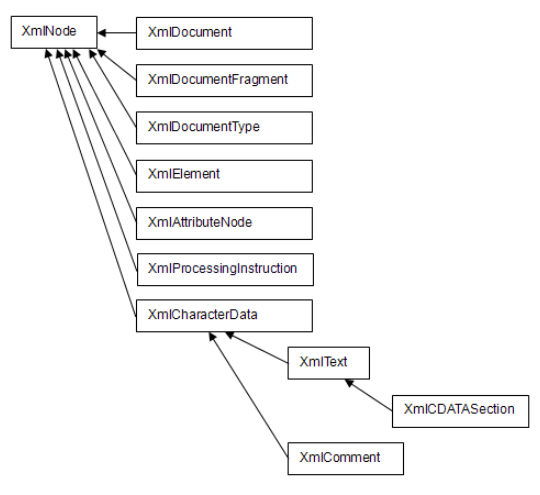
Compatibility with W3C DOM Level 2
The XML package built into Biz / Browser is designed to be used as a business data representation for displaying or printing XML on the screen. Therefore, among the specifications defined by DOM Level 2, functions that are not normally required for this purpose and specifications that significantly impair execution performance have been deleted. It also adds useful features not defined in the W3C DOM, such as XML text loading and saving features and the SelectNodes method.
About W3C DOM Level 3 support
Supports some features of the Document Object Model (DOM) Level 3 Core Specification Version 1.0 W3C Working Draft 26 February 2003 published by the W3C.
Unsupported object
The following objects included in W3C DOM Level 2 are not supported by Biz / Browser and cannot be used.
DocumentType Notation Entity EntityReference
DTD
Does not interpret the DTD. Therefore, it does not validate the structure when parsing XML text or when creating or modifying an XML DOM tree with the DOM API. Also, the default values and access control defined by the DTD are invalid.
External reference resolution
Xrefs are only resolved for SVG
Character code
The characters included in the DOM tree are converted to the SHIFT-JIS character code and constructed in consideration of compatibility with CRS scripts. The only encoding that can be saved with the XmlDocument.Save method is SHIFT-JIS.
However, the number that represents the length of the characters used in the XmlCharacterData.Length property and the XmlCharacterData.SubstringData method is not the number of bytes but the number of characters. If you need the number of bytes, use the Length of the global function.
Added from Version 4.2.0 From here—>
When the XmlDOMImplementation object used when constructing the DOM tree is generated in Unicode mode, the character string included in the DOM tree is retained in Unicode, and the XML encoding method saved by the XmlDocument.Save method is fixed to UTF-8. Become.
To generate an XmlDOMImplementation object in Unicode mode, specify XmlDOMImplementation.Unicode in the constructor.
var impl = new XmlDOMImplementation(XmlDOMImplementation.Unicode);
No special consideration is required to access the DOM tree in Unicode mode. Value settings in Shift-JIS are automatically converted to Unicode, and when Unicode property values and method return values are received in Shift-JIS, they are automatically converted to Shift-JIS. At that time, if a character that cannot be converted is detected, it is replaced with “?”.
<–until here
**Changed namespace definition to be represented as an attribute from Version 4.0.0
Differences between the PC version of Biz / Browser and the Mobile version
The XML package added from Biz / Browser Mobile ver3.0 is a subset of the PC version, and has functions limited to XML analysis and node reference. Only XmlDOMImplementation, XmlDocument, XmlNode, XmlElement, XmlText, XmlNodeList are supported as objects, and properties and methods that modify XML are not implemented.
Also, namespaces and related methods are not supported except for some. When searching for elements that include namespaces, combine the prefix representing the namespace and the element name and treat it as one element name (in the case of <prefix: tagname>, use the element name prefix: tagname).
Differences between Mobile version Biz / Browser and Android version
The XML package implemented from Biz / Browser AI 1.0 basically covers the same classes and functions as the Mobile version, but due to OS restrictions, the Android version has the following restrictions and differences.
- Japanese tag names cannot be handled.
- The index start number in the XPath expression specified by the XmlNode.SelectSingleNode method and XmlNode.SelectNodes method starts from 1.
Also, unlike the Mobile version, each class has the same class hierarchy as the PC version.