MaskEdit Class
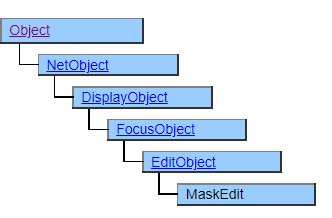
A class that displays mask edits.
Mask Edit is a text box for inputting a fixed-length character string whose input format and output format can be customized by specifying the Mask property.
If the Mask property is not specified, the operability will be the same as for the TextBox class.
The MaskEdit class cannot check the relevance of each input field. For example, the relevance of the date. Use the DateEdit class if you need to enter the exact date, and the NumberEdit class if you need to enter the exact number.
When the entered value is confirmed, the following properties will be updated according to the input status.
Value property
If the input value meets the specifications of the Mask property, it will be updated with the input value. If the Mask property specification is not met, it will be updated to an empty string. As a result, a Touch event is fired if the Value property changes from what it was before. Also, the Change event is fired if the UseChange property is set to $TRUE.
EditText property
It will be updated to the character string displayed on the screen.
InvalidText property
If the input value meets the specifications of the Mask property, it will be updated to $FALSE. If the Mask property specification is not met, it will be updated to $TRUE.
Screen Display Example

Printer output by Doc class
It will be printed in the same way as the screen.
Default properties and ValueType
The default property is Value. The ValueType specification is invalid.
Restrictions when visual style is enabled
Nothing in particular
Precautions when scaling
Nothing in particular