Spread Class
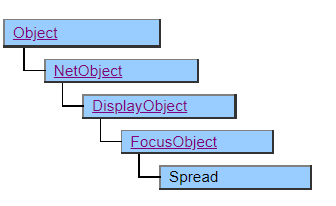
A class that displays a spreadsheet that handles tabular data.
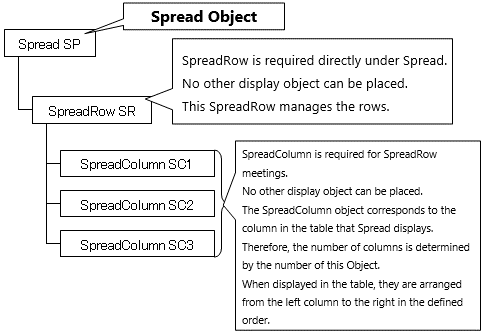
The Spread class works in conjunction with the SpreadRow and SpreadColumn classes.
In order to store the data to be displayed in the spreadsheet, it is necessary to arrange the SpreadRow object and SpreadColomn object in the structure defined under the Spread object.
Since ver5.0, SSpread class that displays high-performance spreadsheets has been added. The SSpread class can realize more advanced functions than the spreadsheet of this class.
Object Structure
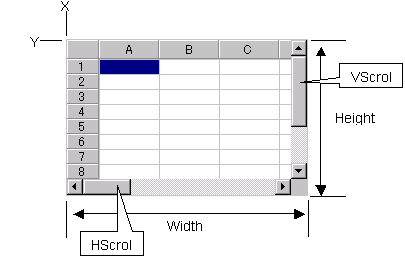
Screen Display Example
Printer Output by Doc class
When the Spread class is used for the printer, the operation differs from that when it is displayed on the screen in the following points.
- If a cell exists in the column direction beyond the display range, the column will not be printed.
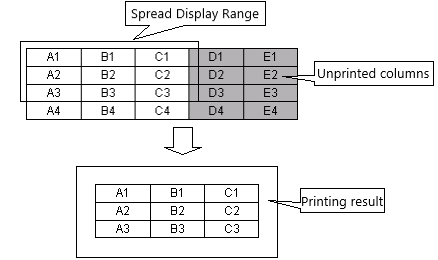
- The Width property of the SpreadColumn class printed in the rightmost column is disabled, and the width is printed up to the display range.
- If a cell exists at a position that exceeds the display range in the row direction, the row before (above) that row will be printed as it is, but the rows after that will not be printed. However, when data is assigned to the Spread object in CSV format, page breaks are automatically performed when the printable range is exceeded. See the CSVDocument.KeyBreak event for more information on this behavior.
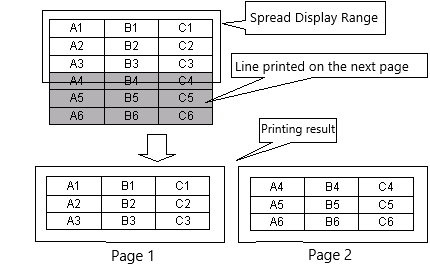
- The Height property of the SpreadRow class set individually is not reflected. The row heights are all the same.
- Column headers are always printed in shaded, centered, bold font, and control by the ShowLabel property is disabled. Also, the line header is not always printed. Control by the ShowNumber property is disabled.
- The print properties (Suppress, (VerticalAlign properties of the SpreadColumn class) are enabled.
Default properties and ValueType
The default property is Value
The ValueType specification is invalid.
Restrictions when visual style is enabled
◆ LabelBgColor property and NumberBgColor property are invalid because they give priority to the theme background.
Precautions when scaling
Nothing in particular.