TreeView Class
A class that displays a tree view.
The TreeView class works in tandem with the TreeItem class.
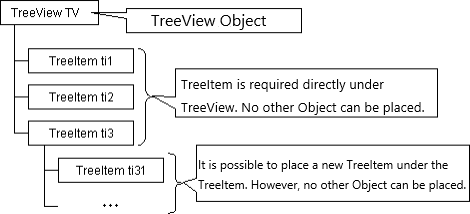
To set the data to be displayed as a tree item, it is necessary to place an object of the TreeItem class or its derived class in the structure defined under the TreeView object.
Since ver5.0, the STree class that makes the tree view easier to handle has been added. The STree class can display a tree structure that is easier to handle than the tree view of this class.
Object Structure
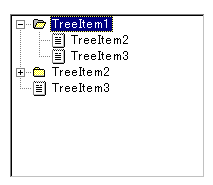
Screen Display Example
Specifying Icon Number
By default, the displayed icon types are as follows.
| Icon No | Icon Image |
|---|---|
| 0 ~ 9 |  |
| 10 ~ 19 |  |
| 20 ~ 29 |  |
| 30 ~ 39 |  |
| 40 ~ 49 |  |
| 50 ~ 59 |  |
| 60 |  |
SetImage method can be used to change to the icon stored in the ImageList object.
Printer output by Doc class
Not subject to printing.
Default properties and ValueType
The default property is Value. The value type specification is invalid.
Restrictions when visual style is enabled
Nothing in particular
Precautions when scaling
◆ The size of the tree display itself is only affected by the font size