TextBox Class
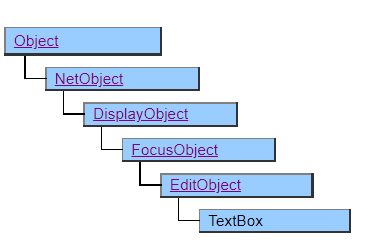
A class that displays a text box in which one line of characters can be entered.
The value of the Value property is formatted and displayed in the text box according to the specification of the Format property.
When inputting, the specification of the Format property becomes invalid and the format corresponding to the value data type is input.
It is possible to switch between insert mode and overwrite mode using the Insert key since Ver.5.0.0
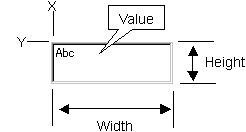
Screen Display Example
Input Format according to Data Type
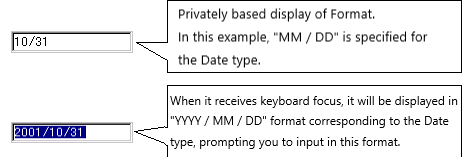
The TextBox class supports input according to ValueType, so when it receives keyboard focus, it invalidates the specification of the Format property and prompts for input in a format corresponding to the data type.
The input formats for each Value Type are shown below.
- String The value of the Value property is displayed as is and you can enter it.
- Date The input format varies depending on what the value of the Value property is at the start of input.
- Number Enter the value of the Value property, which is displayed in all digits including the digits after the decimal point.
- UString Added since Ver.4.2.0
(1) If the hour, minute, and second of the value of the Value property are all 00, the format is "YYYY / MM / DD".
(2) If the value of the Value property has a second of 00, it will be in the "YYYY / MM / DD HH24: MI" format.
(3) In cases other than the above, it will be in "YYYY / MM / DD HH24: Mi: SS" format.
The value of the Value property is displayed and entered as is. The character code of the value of the Value property is Unicode. In Windows98 and ME, since the Unicode input function at the OS level is not supported, it is not possible to input or display Unicode-specific characters, and it cannot be specified together with the MaxLength property.
Printer Output by Doc class
Enclose the characters in a square and display them.
Even if the UString type is specified, all characters are converted to multibyte when printing, so Unicode-specific characters are printed as “?”.
Default properties and ValueType
The default property is Value . ValueType can be String, Number, Fixed, Date and UString.
Added UString since Ver.4.2.0
Restrictions when visual style is enabled
Nothing in particular.
Precautions when scaling
Nothing in particular.