11. ExternalEvent Package
It is a package for linking with external programs of Biz / Browser through events.
Class
| Name | Explanation | Version | ||
| PC | Mobile | AI | ||
| EventListener | Receive external events | 3.1.0 | - | - |
| EventSender | Send an external event | 3.1.0 | - | - |
| SocketListener | Implements TCP / IP server functionality | 5.0.3 | - | - |
| Socket | Implements TCP / IP client functionality | 5.0.3 | - | - |
In this package, in addition to the classes inside Biz / Browser, there are ActiveX BizEventSender, BizEventListener, and BizBrowserEnv objects as external objects. These ActiveX objects are contained in BizLink.dll. Regarding TCP / IP sockets, it is possible to communicate with external applications by general TCP / IP.
ActiveX object
| Name | Explanation | Version | ||
| PC | Mobile | AI | ||
| BizBrowserEnv | Biz / Browser ActiveX object for version acquisition | 3.1.0 | - | - |
| BizEventListener | ActiveX object for receiving external events | 3.1.0 | - | - |
| BizEventSender | ActiveX object for sending external events | 3.1.0 | - | - |
You can load BizEventSender into HTML etc. in Internet Explorer and send the event to Biz / Browser, and you can also issue the event to BizEventListener from Biz / Browser. Similarly, it is possible to send events from Biz / Browser to Biz / Browser and from BizEventSender to BizEventListener. This feature enables more advanced integration of Biz / Browser with HTML and external applications.
Since objects such as BizEventSender are provided as ActiveX objects, it can be linked with programs such as Visual Basic in addition to Internet Explorer.
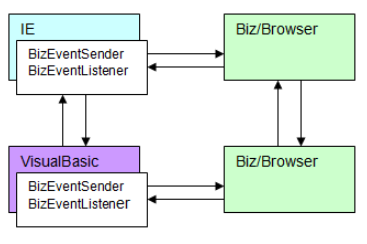
Transmission of external events
External events are propagated to recipients in the same computer as the sender of the event. You cannot send external events to recipients running on other computers over the network. External event transmission uniquely identifies the destination of an event by the concept of service name and port ID. When sending an external event, the sender specifies the service name and port ID. The recipient declares the service name and port ID that it can receive and waits for the event.
Service name
The service name is an distinguished name defined for each application. For example, in the case of a sales management system, you can give it a name such as “SALES”. External event senders and receivers can send and receive using a predetermined common service name to limit the propagation of external events and target only useful external events. increase.
Service name naming convention The service name can start with an alphabetic character, underscore (_) or Japanese, and can be a string of up to 30 characters including alphanumericals, underscores, and Japanese only. Service names are case sensitive.
Port ID
The port ID is an ID for identifying individual objects that receive external events, and is used in combination with the service name. In the sales management system example, it would look like the “HistoryView” port ID for the “SALES” service. In this case, the sender of the external event can send a “Query” event to the “HistoryView” port of the “SALES” service name to display the sales history and so on. You can specify “”, which is a specially reserved ID for the port ID when sending an external event. External events with a port ID of “” are propagated to all recipients with the same service name, regardless of the port ID declared by the recipient.
The service name / port ID pair must be unique within your computer. You cannot use the same service name and port ID more than once. The BizEventListener object inside HTML may be duplicated at a place not intended by the developer by user operation of the “New / Window” function of Internet Explorer. Also, even if it is embedded in Visual Basic, the same thing happens when the user launches two or more programs. The same is true for Biz / Browser. If you need to receive external events, you need to be especially careful about the duplicate service names and port IDs that occur in this way.
Port ID naming convention
The port ID can start with an alphabetic character, underscore (_) or Japanese, and can be a string of up to 30 characters including alphanumericals, underscores, and Japanese only. The port ID is case sensitive.