TrayIcon Class
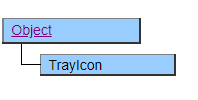
This class is for handling the tray icon displayed on the Windows task bar.
By combining with the Visible property of the Root class, it is possible to create an application that stores Biz / Browser in the task tray.
Mouse operations on the tray icon are notified as events, and by describing the corresponding processing, it is possible to implement returning to the window state or terminating the application.
The image for the icon can be specified with the SetImage and SetIcon methods. If not specified, the Biz / Browser application icon will be displayed as a substitute.
Default properties and ValueType
The default property is Value. The value type specification is invalid.
Usage Example
Form Form1 {
    TrayIcon TrayIcon1 {
        Function OnClicked(e) {
            /* トレイアイコンを消してBiz/Browserを再表示 */
            Visible = $FALSE;
            //.Visible = $TRUE;
            //.SetWindowState($RESTORE + $FRONT);
        }
    }
}
Function OnWindowStateChanged(e) {
    /* Biz/Browserの最小化 */
    if (e.state == $MINIMIZE) {
        /* トレイアイコンを表示してウィンドウ表示を消す */
        Form1.TrayIcon1.Visible = $TRUE;
        Visible = $FALSE;
    }
}