6.4 Display Array Object
This chapter will explain the behavior when displaying objects such as Form and TextBox are arranged.
The basic operation of an array of display objects is the same as that of hidden objects such as Number and Record, and you can operate the array by using array methods and properties such as Insert and Truncate.
For display array objects, in addition to these features, display characteristics are added.
Display Coordinates
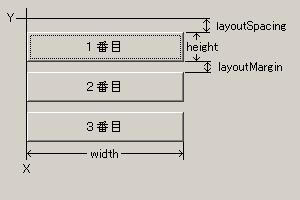
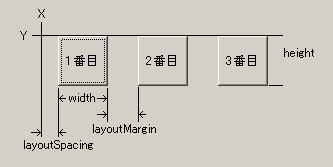
The display position of the arrayed display objects is determined by the Layout, LayoutMargin, and LayoutSpacing properties.
The Layout property represents how the object is laid out. LayoutMargin indicates the display interval, and LayoutSpacing indicates the size of the margin.
If Layout = $ VERTICAL
Layout = $ HORIZONTAL
Another Layout option is $ BLANK . If you select $ BLANK , the adjustment of the display position of the array elements will be disabled, and you will be able to explicitly set the individual coordinates in the script.
Layout = $ BLANK
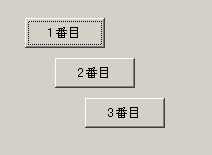
Button btn[3] {
    Width = 80;
    Height = 30;
    Layout = $BLANK;
    Title &= str(Index + 1) + "番目";
}
btn[0].X = 10;
btn[0].Y = 10;
btn[1].X = 40;
btn[1].Y = 50;
btn[2].X = 70;
btn[2].Y = 90;
Event Handler
If you array objects that generate events by user operations, such as Button objects, you can define event handlers in the same way as normal non-array.
Form f {
    Width = 400;
    Height = 200;
    Button btn[3] {
        X = 20;
        Y = 20;
        Width = 80;
        Height = 30;
        LayoutMargin = 5;
        Title &= str(Index + 1) + "番目";

        Function OnTouch(e) {
            MessageBox(e.From.Title);
        }
    }
}
In this way, when adding a Function to an array object, note that the Function also becomes a part of the array element and is copied by the number of elements in the array. Normally, it is not necessary to prepare a Function that only has executable code for each element, which reduces memory efficiency.
Functions that handle array element events work more efficiently if they are defined above the array object. The code in the above example works the same even if you write it as follows. There is a difference in the definition position of Function.
Form f {
    Width = 400;
    Height = 200;
    Button btn[3] {
        X = 20;
        Y = 20;
        Width = 80;
        Height = 30;
        LayoutMargin = 5;
        Title &= str(Index + 1) + "番目";
    }
    Function OnTouch(e) {
        MessageBox(e.From.Title);
    }
}