[ ] « CSV Constant Operator
Loads the CSV constants on the right side of the array object on the left side. By using Record array, SpreadRow, ListItem, etc. on the left side, you can efficiently initialize the object using CSV data.
ListBox initialization example
ListBox ListBox1 {
    ListItem ListItem1[];
    ListItem1 << CSV(.Title, .Value) {
    第1営業部,10021
    第2営業部,10022
    製造管理部,20030
    };
}
Object structure that can load CSV data
The array object that can be specified on the left side must have the following structure.
| Type | Example | Explanation |
|---|---|---|
| One -dimensional array | String data [ ]; | The number of elements in the array corresponds to the number of rows in the CSV data. The number of columns is one, and data itself corresponds to the column. |
| Two -dimensional equivalent array | Record rec [ ] { String data1; String data2; } | The number of elements in the array corresponds to the number of rows in the CSV data. The number of columns is the number of child objects, and data1 and data2 correspond to the columns. |
Row-wise operation when loading CSV data
If the object on the left side is not explicitly defined by the number of elements in the array, the number of elements in the array will be the same as the number of rows in the CSV data regardless of the number of elements before assignment.
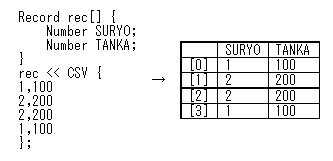
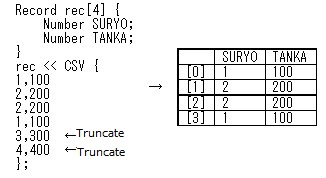
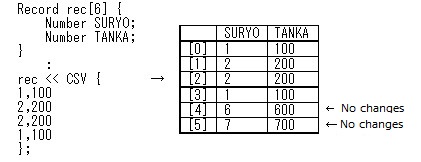
If the object on the left side is explicitly defined by the number of elements in the array, it will be treated as a fixed-length array in CSV data assignment. The number of elements in the array does not change regardless of the number of rows in the CSV data. If there are more CSV data rows than there are elements, the CSV data rows that exceed the number of elements will be truncated. If the CSV data has a small number of rows, the values of subsequent array elements do not change and retain the values before loading the CSV data.
For Number of elements in the array < The number of rows of CSV data
Number of elements in the array > Number of rows of CSV data
Even if the elements have array with explicit numbers,they may have differentr numbers of elements depending on the execution of the Insert method or Delete method.In this case, loading the CSV data will extend the array to the specified number of elements, but it will not be possible to extend the array beyond the specified number of elements or delete elements that already exceed the specified number of elements.
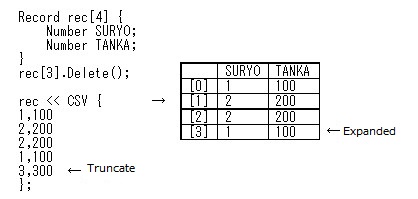
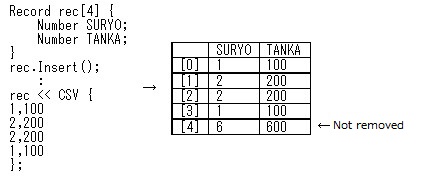
If CSV data is loaded with more elements than the number of elements already specified, CSV data will be assigned up to the current number of elements regardless of the number of specified elements.
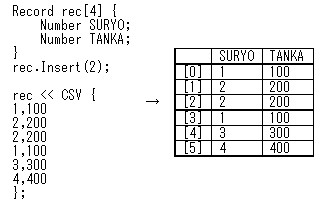
When loading CSV data for an array object to be printed, if the above truncation condition is met before loading the last row of CSV data, a page break will occur and the CSV data will continue to be loaded on the next page.See also the description of the Doc class for printing operation.
Column-wise operation when loading CSV Data
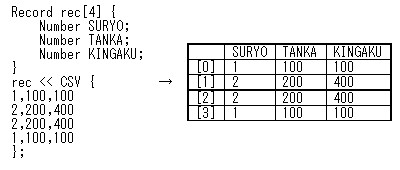
The CSV data columns are assigned in the order in which the objects to be assigned are defined. If there are more objects to be assigned than the number of columns in the CSV data, the objects that exceed the number of columns in the CSV data will not change. Also, if there are more columns in the CSV data, the columns that do not correspond to the object to which they are assigned will be truncated.
Use column names as object names and property names
When loading CSV data with column names into an array object, the column name determines the object or property to which it is assigned. The order of the columns in the CSV data has no meaning. The name of the column is set by the SetColumnName method or CSV constant.
Example to use as an object name
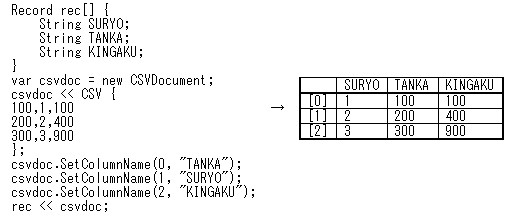
In this example, the column name is an object name. As a result, each column is assigned to an object with the same name. If an object that matches the name of a column is not found in the object tree to which it is assigned, the column is truncated and does not affect the result of the assignment.
Example to use as a property name
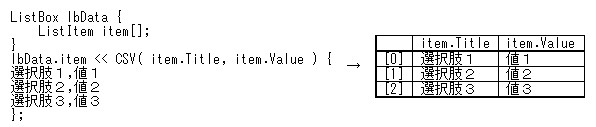
In this example, the column names are object names and property names. The object name and property name with a period is separated. As a result, the first column is assigned to the Title property of the ListItem class and the second column is assigned to the Value property of the ListItem class.
Notes:-
-Multiple periods cannot be used. Strings after the second period are ignored. -If the object name is omitted (column name such as “.Title” or “.Value”), it is regarded as a property of the assignment destination object. -If the name after the period matches the name of the child object, the default property of that child object is targeted.
Example of setting to the property of the child object of the assignment destination:-
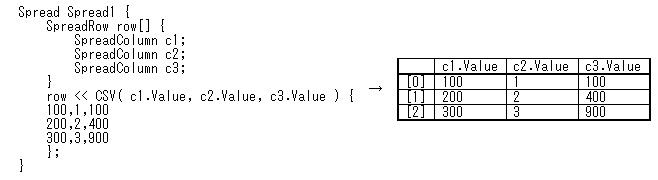
In this example, the name and property name of the child object are specified. As a result, the first column is assigned to the Value property of c1 (SpreadColumn class), the second column is assigned to c2, and the third column is assigned to the Value property of c3.
Event occurrence when loading CSV data
Various events occur as the CSV is loaded. It also raises an event defined by the class to which it is assigned. For example, if a page break occurs when loading a CSV for the object to be printed, the Doc.PageChange event will occur.