FlexItem.Title Property
Specifies the column title.
If you specify UString for ValueType, this property behaves as a UString type.
Added since Ver.5.0.3
FlexColumnSet and FlexRowSet titles are displayed separately from the underlying FlexItem.
If you do not want to display the title, set the string “null”. Even if null is set, it becomes “null” due to character string conversion, so it is synonymous.
If “null” is set, it will be hidden including the title frame, and if possible, the display area will not be allocated.
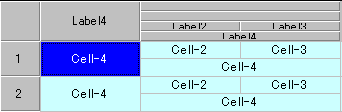
Display example when Title = null is not specified
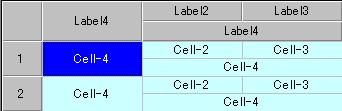
Display example when Title = null is specified
Script example
FlexRecord FlexRecord1 {
    FlexHeader header {
        Numbered = $TRUE;
    }
    FlexLabel FlexLabel4 {
        Title = "Label4";
    }
    FlexRowSet RowSet1 {
        Title = null;
        FlexColumnSet ColSet1 {
            Title = null;
            FlexLabel FlexLabel2 {
                Title = "Label2";
            }
            FlexLabel FlexLabel3 {
                Title = "Label3";
            }
        }
        FlexLabel FlexLabel4 {
            Title = "Label4";
        }
    }
}