FlexItem.TitleRows Property
Specifies the amount of occupancy in the number of rows when a multi-row column title is displayed.
When displaying multi-row column titles, by default each row is displayed at equal heights. The TitleRows property causes the title displayed by the specified FlexItem to occupy the specified number of rows. The actual height displayed is determined by proportionally dividing the height of the entire title defined by FlexView.TitleHeight by the total number of rows using the value of the TitleRows property. For example, when two rows of titles are displayed, if one of the TitleRows properties is specified as 2, it will be apportioned by 2/3 and 1/3 of TitleHeight.
TitleRow example
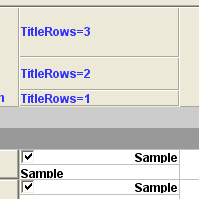
FlexView FlexView1 {
    :
    FlexRecord FlexRecord1 {
        :
        FlexRowSet FlexRowSet1 {
            :
            Title = "TitleRows=3";
            TitleRows = 3;
            :
            FlexCheckButton FlexCheckButton1 {
                :
                Title = "TitleRows=2";
                TitleRows = 2;
                :
            }
            FlexTextBox FlexTextBox1 {
                :
                Title = "TitleRows=1";
                TitleRows = 1;
                :
            }
        }
    }
}
Added since Ver.4.1.0