FlexListBox.ListData Property
Specifies the options displayed in the list box.
If specify UString for ValueType, this property behaves as a UString type.
Added since Ver.5.0.3
The options are specified as comma-separated strings. It cannot contain line breaks or tabs.
If want to include a comma in the options, enclose one element in double-coating (“) or escape it with .
If want to include double coating (“) in the options, write double coating (“) instead of enclosing one element in double coating (“)” or escape with .
Specification example
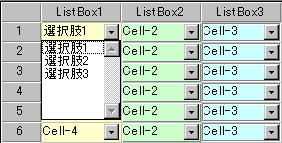
FlexListBox1.ListData = "選択肢1,選択肢2,選択肢3";
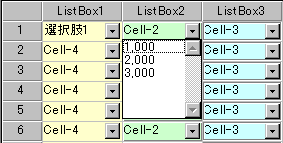
FlexListBox2.ListData = "\"1,000\",\"2,000\",\"3,000\"";
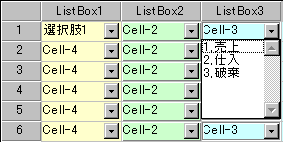
FlexListBox3.ListData = "1\\,売上,2\\,仕入,3\\,破棄";
Display example
ListData = “選択肢1,選択肢2,選択肢3”
ListData = “"1,000","2,000","3,000"“
ListData = “1\,売上,2\,仕入,3\,破棄”