FlexTreeHeader.Foldable Property
Specifies that the tree can be collapsed by screen operation.
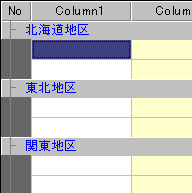
If you specify $ TRUE, a collapse icon is displayed, and you can collapse or undo the tree with a left mouse click. You can also use the left arrow key to collapse the tree and the right arrow key to undo it.
If you specify $ FALSE, the collapse icon will not be displayed and you will not be able to collapse the tree by operating the screen.
The Foldable property cannot be specified individually for each row.
Display example
Foldable = $TRUE
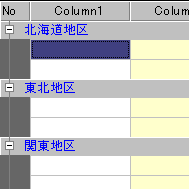
Foldable = $FALSE