SSpread.RowMerge Property
Set whether to merge (group) cells with the same contents in a row as one cell that spans multiple columns.
Before setting this property, use the Row property to specify the desired row.
Specify the following values. The initial value is $MergeNone
| Constant | Value | Description |
|---|---|---|
| $MergeNone | 0 | Do not merge |
| $MergeAlways | 1 | Always merge Whenever cells with the same content are consecutive, they are merged. |
| $MergeRestricted | 2 | Restricted merge If cells with the same contents are consecutive, they will be merged only if the cells above them are merged. |
Operation Example
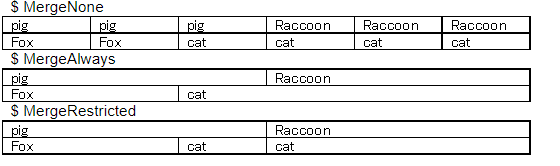
For the merged cells, the settings of the upper left cell (background color, etc.) are valid.
The data in the other merged cells is only hidden and not deleted.
Column merging is set with the ColMerge property.
Example of usage
Row = 1;
RowMerge = $MergeAlways;
Row = 2;
RowMerge = $MergeRestricted;
Related Item
ColMerge property