SSpread.TypeButtonShadowSize Property
In the command button type cell, set the depth of the bump of the command button.
Only valid for standard styles, such as when the UseVisualStyles property is $UseVisualStylesNo (do not use visual styles).
Only valid for cells with $CellTypeButton (command button type) set in the CellType property.
Before setting this property, use Col and Row properties, and so on to specify what to do.
The initial value is 1.
This property is subject to for command button cells.
Command button color setting properties
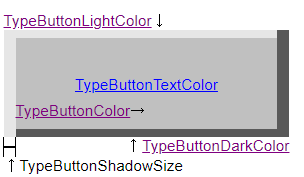
Example of usage
UseVisualStyles = $UseVisualStylesNo;
Col = 2;
Row = 2;
CellType = $CellTypeButton;
TypeButtonText = "Button1";
TypeButtonColor = $DCYAN;
TypeButtonTextColor = $WHITE;
TypeButtonLightColor = "#DAEAD0";
TypeButtonDarkColor = "#005C50";
TypeButtonShadowSize = 4;

Col = 2;
Row = 4;
CellType = $CellTypeButton;

Col = 2;
Row = 6;
CellType = $CellTypeButton;

BlockMode = $TRUE;
Col = 4;
Row = 3;
Col2 = 4;
Row2 = 5;
CellType = $CellTypeButton;
BlockMode = $FALSE;
Related Items
AppearanceStyle,CellType, TypeButtonColor, TypeButtonDarkColor, TypeButtonLightColor, TypeButtonTextColor, UseVisualStyles properties