Form.MouseMove Event
Occurs when the mouse pointer moves that meets the conditions specified in the UseMouseMove property. By processing with the OnMouseMove event handler, it is possible to perform processing to track the movement of the mouse pointer.
The following child objects are attached to the Event object.
| Type | Name | Description |
|---|---|---|
| Number | ShiftKey | 1 if the Shift key is pressed, 0 otherwise |
| Number | CtrlKeyKey | 1 if the Ctrl key is pressed, 0 otherwise |
| Number | LeftButton | 1 if the left mouse button is pressed, 0 otherwise |
| Number | RightButton | 1 if the right mouse button is pressed, 0 otherwise |
| Number | xPos | X coordinate of mouse pointer on Form object |
| Number | yPos | Y coordinate of mouse pointer on Form object |
Example of use
Form f {
    ::
    UseMouseMove = $ LEFTCLICK;
    Label: Number labVolume {
        ::
    }
    Function OnMouseMove (e) {
        / * Is it on the lab Volume ? * /
        if (labVolume.X <= e.xPos && e.xPos <labVolume.X + labVolume.Width &&
            labVolume.Y <= e.yPos && e.yPos <labVolume.Y + labVolume.Height) {
            var v = roundup ((e.xPos --labVolume.X) / labVolume.Width * 100);
            labVolume = str (v) + "%";
        }
    }
}
The MouseMove event only fires when the Biz / Browser window is active and the mouse pointer is above the Form object. Also, if the mouse pointer touches another object placed on the Form, the event will stop firing.
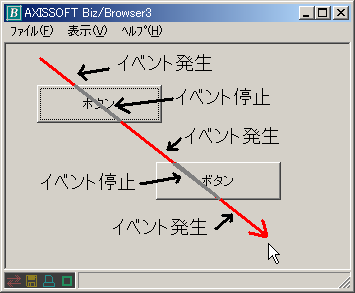
The exception is the Label object placed on the Form object, which also raises the MouseMove event when the mouse pointer rests on the Label object.
Not supported in AI