Label.BorderStyle Property
Specify the border type. Only valid if the Border property is $ TRUE .
| Constant | Value | Description |
|---|---|---|
| $SUNKEN | 0 | The whole is displayed in a concave shape |
| $RISED | 1 | The whole is displayed in a convex shape |
| $ETCHED | 2 | The line of the frame is displayed in a concave shape. |
| $BUMP | 3 | Displays the frame line in a convex shape |
| $GRAYFRAME | 4 | Shows a border in two colors of gray |
| $SOFT | 5 | Display the frame in black and white |
| $SOFTETCHED | 6 | The border is displayed in a soft concave shape. |
| $SOFTBUMP | 7 | The border is displayed in a soft convex shape. |
| $PLANE | 8 | Display with a single black line |
| $DASH | 9 | Display with a long dotted line On mobile, it will be displayed the same as $DOT |
| $ DOT | 10 | Display with a fine dotted line |
| $FLATSUNKEN | 11 | Displays the whole with a low concave shape |
| $FLATRISED | 12 | Display the whole with a low convex shape |
Added $PLANE and later version since Ver.4.0.0, Mobile Ver.3.0.0
Display Example
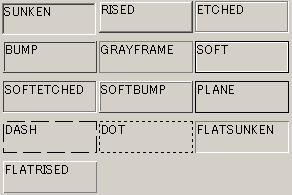
Added since Mobile Ver.2.0.0