Spread.ColumnPosition Property
The column position of the selected column. The leftmost column is 0 .
If there is no display row at all, or if there is no display column at all, it will be -1 if it is not in the selected state .
Note that the ColumnPosition property always indicates the column position of the cursor, but its value is the defined position of the SpreadColumn object, not the column position on the display.
If the Visible property of the SpreadColumn class is specified in $ FALSE, the column will not be displayed on the screen, so the column position on the screen and the column position of the SpreadColumn object will not match.
SpreadColumn C1 {
    Title = "C1";
}
SpreadColumn C2 {
    Visible = $FALSE;
    Title = "C2";
}
SpreadColumn C3 {
    Title = "c3";
}
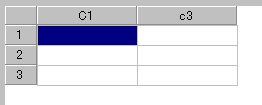
C1 has a column number of 0, C2 has a column number of 1, and C3 has a column number of 2. Since C2 is hidden by specifying Visible = $ FALSE, C1 is the 0th column and C3 is the 1st column on the screen.
The column with Visible = $ FALSE will not be placed, and if you move the cursor left or right, the ColumnPosition property will skip the column with Visible = $ FALSE.
When setting the value from the script, if you specify a value outside the range of the column or a value corresponding to the column with Visible = $ FALSE, the value is adjusted to the nearby column position that can actually be selected and set.